


Mountain View, CA, USA
2010
  |  By Vasiya Krishnan
Use Conversational Analytics in BigQuery to query data, run analyses, and generate reports using natural language on data in BigQuery and Lakehouse.
  |  By Thomas Anchor
Learn to use BigQuery’s new AI.AGG function to analyze unstructured data such as logs and documents at scale.
  |  By Remy Pereira
Data analysis at scale to identify hidden fraud and achieve transaction savings.
  |  By Sandeep Karmarkar
Managed Python User-Defined Functions (UDFs) in BigQuery let you define and execute Python scalar functions directly within your BigQuery SQL queries.
  |  By Guru Rangavittal
BigQuery Graph allows you to build a digital twin of your entire supply chain by turning your physical world—items, recipes, and locations—into a searchable map of nodes and edges, providing a new level of clarity.
  |  By Tarak Parekh
Learn how to use Connected Sheets to analyze governed BigQuery data warehouse from a familiar Google Sheets interface.
  |  By Greg Leon
New Google Earth AI models and datasets on BigQuery and Gemini Enterprise Agent Platform help to understand our planet and its communities.
  |  By Neeraja Rentachintala
BigQuery unveils new capabilities for lakehouse, knowledge graph, built-in AI, and agentic-first experiences.
  |  By Yan Sun
Templates in BigQuery Studio notebook gallery, now GA, help you bypass the setup phase and jump straight into discovery.
  |  By Candice Chen
BigQuery Graph lets data professionals model, analyze and visualize massive-scale relationships in an entirely new way.
  |  By Google Cloud Tech
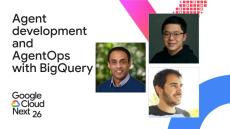
Join this session to learn about Agent Development Kit (ADK) and Model Context Protocol (MCP) integration methods that standardize how agents connect to your data while removing the need to build custom database connectors from scratch. Discover how to build agents with the ADK that accesses BigQuery for analysis, Google Maps for geospatial insights, and AlloyDB for transactions – all in a single workflow. Learn how to implement agent operations (AgentOps) for deep observability into both agent performance and cost with a single line of code.
  |  By Google Cloud Tech
Python UDFs now Generally Available (GA), you can run custom Python code natively, securely, and serverlessly inside your SQL statements. Write standard SQL, import libraries like BeautifulSoup, or run machine learning tokenizers with zero infrastructure management. Speaker: Products Mentioned: BigQuery, Python User Defined Function.
  |  By Google Cloud Tech
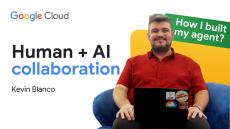
Check out the repo here. Manually vetting hundreds of project requests is a thing of the past. Imagine receiving every proposal with a built in risk score, resource check, and "Go/No-Go" recommendation—delivered in seconds. Join Kevin Blanco as he demonstrates how to build a powerful multi-agent system that seamlessly integrates Google Cloud and Asana. Watch along and see a real world example of automating an infrastructure request, returning instant historical pattern analysis and live workspace context without any manual steps.
  |  By Google Cloud Tech
Join Paul Ramsey, Product Manager at Google, for a demonstration of AlloyDB’s new Lakehouse Federation capability. Using a fictional financial services firm, Cymbal Investments, we show how analysts can research S&P 500 trends by combining real-time vector search with data in BigQuery and Google Cloud Lakehouse. In this video, you will see: Learn how AlloyDB enables cloud and AI transformation for your data platform.
  |  By Google Cloud Tech
For many, running generative AI over massive datasets has felt out of reach due to costs and slow processing times. Others settle for traditional ML techniques that require specialized skill sets and often deliver lower-quality results. With optimized mode for BigQuery AI functions, you can now get LLM-quality results at a fraction of the cost and at BigQuery speeds. In this video, we’ll show you how BigQuery uses model distillation and embeddings to process massive datasets, reducing query latency and token consumption.
  |  By Google Cloud Tech
Did you know that BigQuery can run GQL queries? BigQuery Graph easily uncovers connections in your datasets, alongside your relational SQL queries.
  |  By Google Cloud Tech
Did you know you can call a Gemini model directly from a SQL query in BigQuery? In this hands-on codelab, Ayo and Annie do exactly that, and use it to solve a real problem: converting messy, unstructured text into clean, structured data at scale. This is Episode 1 of our multi-part series where we build a fully functional, data-aware AI agent on Google Cloud. *What we cover:* Chapters: Speakers: Ayo Adedeji, Annie Wang Products Mentioned: Gemini, BigQuery.
  |  By Google Cloud Tech
Discover how to build a powerful data agent using ADK, BigQuery and CloudSQL. This video guides you through transforming unstructured data into structured knowledge, enabling intelligent applications. Watch along and learn how to create RAG pipelines, leverage Gemini for vector embeddings, and automate processes with Dataflow to achieve nuanced, context aware insights. Chapters: Speaker: Debi Cabrera Products Mentioned: BigQuery, CloudSQL, Agentverse, Gemini, Agent Development Kit.
  |  By Google Cloud Tech
You’ve moved your data to Google Cloud. Now it is time to make sure it’s accurate, secure, and cost effective. This video concludes our migration series by focusing on the critical steps following data transfer from Databricks, Teradata, Snowflake, Cloudera and many other platforms. You’ve moved your data to Google Cloud. Now it is time to make sure it’s accurate, secure, and cost effective. This video concludes our migration series by focusing on the critical steps following data transfer from Databricks, Teradata, Snowflake, Cloudera and many other platforms.
  |  By Google Cloud Tech
Following your migration assessment, it is time to execute the transfer of your data and SQL queries into Google Cloud. This video dives into the specific tools and services that simplify migrating workloads from Snowflake, Teradata, Cloudera, and Databricks into BigQuery, Dataproc, and Google Cloud Storage.

BigQuery is Google's serverless, highly scalable, enterprise data warehouse designed to make all your data analysts productive at an unmatched price-performance. Because there is no infrastructure to manage, you can focus on analyzing data to find meaningful insights using familiar SQL without the need for a database administrator.

Analyze all your data by creating a logical data warehouse over managed, columnar storage, as well as data from object storage and spreadsheets. Build and operationalize machine learning solutions with simple SQL. Easily and securely share insights within your organization and beyond as datasets, queries, spreadsheets, and reports. BigQuery allows organizations to capture and analyze data in real time using its powerful streaming ingestion capability so that your insights are always current, and it’s free for up to 1 TB of data analyzed each month and 10 GB of data stored.