Understanding Cumulative Layout Shift (CLS)
Cumulative Layout Shift or CLS, Web Vitals and Core Web Vitals, these terms seem complicated, but it’s actually not that hard to understand what they stand for.
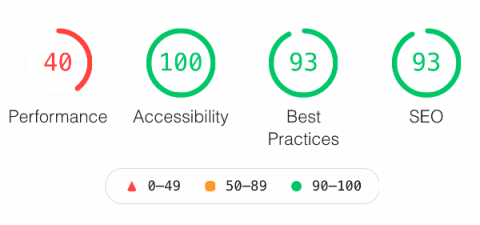
If you know nothing about your customers’ experience with your website, Google Lighthouse might be the right tool for you. Google Lighthouse is an open source automated website auditing tool from Google, used for discovering issues and opportunities to improve the overall user experience of your website.
The execution order of the elements in an Apache JMeter performance test plan is very important, it helps understand the timeline of events and how your test will behave. Make sure that you understand every JMeter element before adding it to your test plan, this will help create faster performance tests and not jump into various errors.
How do you manage to release often without major issues? Create a checklist for your software releases, a list of steps to blindly follow every time release a new piece of software. Here is an example of what steps your list should contain: This list can go on and on, by I would suggest that every team should have a similar checklist. This checklist should be reviewed and updated every 1-2 weeks (doesn’t matter if you do Scrum or Kanban), most likely at the team retrospective meetings.
Leaving movie quotes aside, load testing helps you understand how your application behaves under both normal and peak conditions, and discover what is causing the degradation. But truly, the main goal of load testing is not to lose customers. You don’t do load testing for the sake of doing load testing.
It’s so easy to record a load test for your website, just add to Chrome Browser the JMeter in the Cloud Chrome Extension and you’ll be able to record and run a load in less than 60 seconds. Let’s have a deeper look how to do this. This is it, less than 60 seconds to record a load test. Now you can: More detail can be found in this video. Written by Bogdan Vazzolla.
If you need to run a JMeter Load Test and it’s a burden to download Apache JMeter locally on your machine, open it and manually create your JMeter test file, now there is a much easier way to record browser interactions with JMeter. The LoadFocus | JMeter Load Testing in the Cloud Chrome Extension for recording JMeter test script files (.JMX files) from LoadFocus is a free tool to easily record and run load tests in the cloud.
Well into the pandemic and with the E-commerce boom rapidly accelerating due to people needing to stay inside, you’ll need to make sure that your website and mobile applications are performing well under high load for the holiday shopping season and especially for Black Friday and Cyber Monday sale events.
Apache JMeter is a Java open source tool. If you want to run load or performance tests using Apache JMeter, you can use their Graphic User Interface (GUI) and you don’t need to know any programming language, follow the JMeter documentation and you are ready to go to design your API testing scenarios.
Often software developers get to ask themselves the question: Should I just run the tests in the GUI now that I finished developing them? The answer is pretty simple, NO. You should not use the GUI when running the tests. The GUI should be used only for developing the tests.