Systems | Development | Analytics | API | Testing

Introducing Active Assist recommendations for BigQuery capacity planning

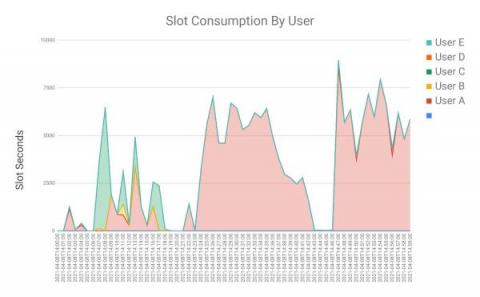
BigQuery already offers highly flexible pricing models, such as the on-demand and flat-rate pricing for running queries, to meet the diverse needs of our users. Today, we’re excited to make it even easier for you to optimize BigQuery usage with new BigQuery slot recommendations powered by Active Assist, a part of Google Cloud’s AIOps solution that uses data, intelligence, and machine learning to reduce cloud complexity and administrative toil.

Enhance your analysis with new international Google Trends datasets in BigQuery

Sharing and exchanging data with other organizations is a critical element of any organization’s analytics strategy. In fact, BigQuery customers are already sharing data using our existing infrastructure, with over 4,500 customers swapping data across organizational boundaries. Creating seamless access to analytics workflows and insights has become that much easier with the introduction of Analytics Hub and surfacing datasets unique to Google.

Ingesting Google Cloud Storage files to BigQuery using Cloud Functions and Serverless Spark

Apache Spark has become a popular platform as it can serve all of data engineering, data exploration, and machine learning use cases. However, Spark still requires the on-premises way of managing clusters and tuning infrastructure for each job.

Using GeoJSON in BigQuery for geospatial analytics

The first step in most analytical workloads is to ingest the data that you need for your analysis into your data warehouse. For geospatial analysis involving point, line, or polygon data, ingesting data can be complex because geospatial data comes in myriad data formats. Two of the most popular geospatial formats are GeoJSON and GeoJSON-NL (newline-delimited geoJSON).

How Spanner and BigQuery work together to handle transactional and analytical workloads

As businesses scale to meet the demands of their customers, so do their need for efficient products to collect, manage and analyze data to meet their business goals. Whether you are building a multi-player game or a global e-commerce platform, it's critical to ensure that data can be stored and queried at scale with strong consistency and then processed for analysis to deliver real-time insights.

ArcGIS and BigQuery - a match made for geodata

Geographical data is one of the critical datasets for data-driven organizations to make informed business decisions. As the data is growing more than ever before, it’s becoming more challenging to manage and analyze mammoth datasets using traditional databases, this is true for geographical data as well as it requires significant computational power to process. Esri has been one of the leading companies in Geospatial software development since 1969.

Learn how to stream JSON data into BigQuery using the new BigQuery Storage Write API

The Google BigQuery Write API offers high-performance batching and streaming in one unified API. The previous post in this series introduced the BigQuery Write API. In this post, we'll show how to stream JSON data to BigQuery by using the Java client library.

Streaming data into BigQuery using Storage Write API

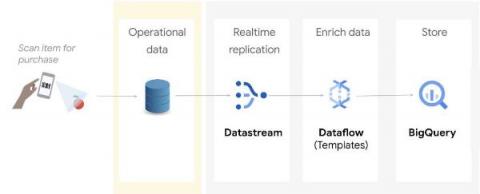
BigQuery is a serverless, highly scalable, and cost-effective data warehouse that customers love. Similarly, Dataflow is a serverless, horizontally and vertically scaling platform for large scale data processing. Many users use both these products in conjunction to get timely analytics from the immense volume of data a modern enterprise generates.

6 SAP companies driving business results with BigQuery

Digital technology promises transformative results. Yet, it’s not uncommon to encounter potholes and speed bumps along the way. One area that frequently trips up businesses is putting data into action. It can be extraordinarily difficult to take advantage of the right data at exactly the right time — in real time — to drive decision-making. For SAP customers wanting to maximize the value of their data, Google Cloud offers a number of capabilities.

Speed up your Teradata migration with the BigQuery Permission Mapper tool

During a Teradata migration to BigQuery, one complex and time consuming process is migrating Teradata users and their permissions to the respective ones in GCP. This mapping process requires admin and security teams to manually analyze, compare, and match hundreds to thousands of Teradata user permissions to BigQuery IAM permissions. We already described this manual process for some common data access patterns in our earlier blog post.