Systems | Development | Analytics | API | Testing

Selenium Click Link: Different Ways to Automate Link Clicks

Clicking links is one of the most basic things a user can do on a website. If you're writing test scripts, it’s also one of the most common actions you’ll need to automate. With Selenium WebDriver, you can interact with any hyperlink on the page, no matter if it's visible, hidden, dynamic, or opens in a new tab. All you need is the right locator and a clear understanding of how the browser responds.
MCP Server in Testing: What It Means for You

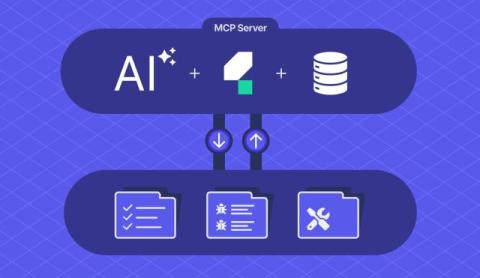
Teams use different tools in their software testing life cycle. The problem? Each tool has its own way of communicating. The MCP (Model Context Protocol) Server is a new approach to integrating these tools. It’s like a universal translator, so your testing tools, scripts, and AI copilots can share context without endless plugins or one-off integrations.

How does a TCoE balance automation and manual testing to maximize efficiency?

A TCoE should automate the repeatable, detail-heavy regression checks to remove human error and speed releases, while keeping room for manual testing where judgment matters or ROI is low. Automate execution to free the team to focus on new functionality and high-value scripts, and leave fringe or one-off cases manual so effort pays off. — Parker Reguero, RVP of Sales at Katalon Learn more Follow Katalon for more insights in our series!

How to type into a text box using Selenium?

Typing into a text box is one of the first things you'll want to do when working with Selenium. It’s a core action that helps simulate real user input to fill out things like login forms, search fields, checkout screens. This guide will walk you through the exact steps to type into a text box using Selenium WebDriver. Whether you're new to automation or just looking for a refresher on Selenium input text techniques, this article has you covered.

How To Click Hyperlinks in Selenium WebDriver

Hyperlinks connect users to pages, actions, and content. In web testing, they are everywhere. That’s why knowing how to click a hyperlink in Selenium WebDriver is one of the first and most essential skills for any test automation engineer. Selenium makes it simple, but real-world links come with variations. Some are plain anchor tags. Some use JavaScript. Others open new tabs or redirect dynamically. Each requires a slightly different approach.

How to select date from Datepicker in Selenium WebDriver with Java?

Selecting a date from a calendar widget is one of the most common tasks in UI automation. And yet, it often turns into a tricky challenge, especially when the datepicker behaves differently on each site. Sometimes it's a jQuery calendar, sometimes it's a custom airline-style picker, and in many cases, it doesn't respond well to direct input. If you've ever wrestled with a flaky test just to select one simple date, you're not alone.

Selenium WebDriver NPM Package: Setup and Usage

Browser automation with JavaScript is more powerful than ever. And if you're just starting out, using the selenium webdriver npm package is one of the most flexible ways to write and run your own automated browser scripts. Whether you're testing a login flow or building a web scraper, Selenium WebDriver helps you take control of the browser automatically. Add in NPM, and now you have a fast setup, easy dependency management and the full support of the Node.js ecosystem.

How can we make test automation more accessible to non-technical stakeholders?

The way to make automation accessible is to simplify three things for everyone creating tests running tests and analyzing results. Let non technical teammates run existing suites on demand and use smarter analysis including AI to surface who what why quickly so leaders and support can see what is broken without pulling in engineers. — Philip Becker, Sr. Product Manager at Katalon Learn more Follow Katalon for more insights in our series!

Verify Element Presence in Selenium WebDriver

In Selenium, interacting with a page element only works if that element exists. That's why checking whether an element is present is one of the first things any test should do. It confirms that the application has loaded the expected content and is ready for the next step. When you verify element present in Selenium, you reduce flaky failures and improve test reliability. This is especially helpful when testing dynamic apps that load content based on user actions or network timing.

Highlighting Elements in Selenium for Better Testing

When running UI tests with Selenium, you don’t always know what’s happening behind the scenes. Is your script clicking the right button? Is it filling the correct field? That’s where highlighting an element in Selenium makes a difference. Highlighting is a simple trick that gives you visual confirmation during test execution. It changes the appearance of the element temporarily (usually by adding a border or background color) so you can instantly see where the action is taking place.

Does automation reduce the need for skilled manual testers, or are they still essential?

Automation does not replace skilled manual testers. You start by exploring the app as a human to understand how it behaves, then automate those steps with low code, record and playback, code, or a mix. Automation brings speed while manual skill brings insight. Use both to form a complete testing strategy. — Alex Martins, VP of Strategy at Katalon Learn more Follow Katalon for more insights in our series!

Debugging in Selenium: Techniques and Best Practices

When an automated test fails, the real work begins. You need to figure out what went wrong, where, and why. That’s where debugging in Selenium comes in. Whether you're dealing with a flaky test, a missing element, or a silent script timeout, debugging helps uncover the root cause. It’s not just a technical step. It’s a habit that shapes better test design and builds trust in your automation suite. Depending on how your tests are set up, there are many ways to debug them effectively.

Get Title in Selenium WebDriver with Examples

Page titles may look simple, but they play a powerful role in UI testing. Every time you land on a web page, the browser title tells you where you are. That same logic applies to automation. With Selenium WebDriver, you can get the page title to confirm if your test is on the right screen. If you're trying to validate navigation, this ability to get title in Selenium helps confirm that the application behaves as expected. In this article, we’ll walk you through: Let’s get started.

Introducing Agents into the Test Lifecycle Without Replacing Your Team

AI agents aren’t futuristic abstractions. They’re focused, assistive tools that can plug into your existing test lifecycle today. From summarizing logs to drafting test cases and clustering defects, these agents reduce repetitive tasks without replacing your team. They're scoped, auditable, and easy to start small with, making them ideal for enterprise environments. The key is to treat agents as collaborators that accelerate insight, not as autonomous systems.

The Assistive Era of Testing: Augment, Not Automate

The future of testing isn’t about replacing humans with AI. It’s about augmenting your team’s capabilities. Assistive AI tools can summarize logs, generate test cases, triage defects, and surface insights - all while keeping humans in control. This low-risk, high-leverage approach helps enterprise teams move faster, improve coverage, and focus human judgment where it matters most. Start small, measure impact, and treat AI as a test assistant - not a magic box.

How can automated testing enhance developer-tester collaboration in Agile development?

Automated tests act as a shared, code-based language for testers and developers. They make what is being tested explicit and turn failures into clear signals with details like missing locators, browser logs, and network data. Looking at the same artifact builds connection and speeds fixes in Agile teams. — Coty Rosenblath, CTO at Katalon Learn more Follow Katalon for more insights in our series!

Cross Browser Testing in Selenium: How to Get Started

Cross browser testing in Selenium helps teams ensure their websites work smoothly for everyone, no matter which browser or operating system they use. From Chrome to Safari, Firefox to Edge, each browser interprets code a little differently. Even the same browser can behave in surprising ways across versions or devices. That’s where Selenium WebDriver comes in.

Why Testing Needs to Change and What Comes Next

Testing is hitting its limits in speed, scale, and insight. AI-augmented and agentic systems can help but only if we adopt them intentionally. This blog series lays out a Crawl–Walk–Run maturity path for adopting agentic testing capabilities safely and strategically. We’ll show you how to move from assistive agents to coordinated systems without losing control or trust.

Locators in Selenium: Types and Examples

Every action you automate in Selenium starts with one thing: finding the right web element. That’s where locators come in. They guide Selenium to the exact button, input field, or text box it needs to interact with. Locators in Selenium are essential. Without them, you can't click a button, fill out a form, or verify if a message appears on the screen. They're the foundation of every test case you write. In this article, we’ll walk you through: Let’s get started!

What are the trade-offs between using open-source tools and a commercial solution?

Open source brings real power, but its goals may not match your organization. Look at community health, whether it fits your use case, and how you will handle support, updates, and patches. Consider the integrations your stack requires. Weigh these against a commercial platform that offers formal support, a roadmap, and hosted infrastructure to reduce your maintenance burden. — Coty Rosenblath, CTO at Katalon.

Find Elements in Selenium with Python: A Complete Guide

When you write a Selenium test, every interaction depends on one crucial step: identifying the right element. Whether it's a button, input field, dropdown, or link, Selenium must find it before it can click, type, or select. This is where element locators come in. These strategies help your Python scripts pinpoint specific pieces of the page, just like a user would. In this guide, you'll learn exactly how to find element in Selenium with Python confidently and consistently.

Why AI-native Testing Redefines Quality

The AI mandate is real. Boards and executives are demanding that software organizations move faster, embrace AI, and deliver without breaking trust. Development velocity is accelerating at machine speed, but testing has not kept up. The question every QA leader faces today is simple: will quality keep pace, or will it become the bottleneck? This is where the shift from automation to AI-native testing comes in.

From Bottleneck to Boardroom: Unlocking Test Automation ROI with Katalon TrueTest

Software is now the front door of your business, and when it fails, revenue and trust are on the line. Yet quality assurance is still too often treated as a cost center instead of a growth driver. The AI mandate is raising the stakes: boards expect faster delivery through AI and low-code, but that speed creates more complexity to test. Most QA teams still rely on manual processes, leaving quality as the bottleneck.

Fluent Wait in Selenium: Guide and Examples

Waits are a big deal in Selenium. They help your tests stay in sync with dynamic pages, slow-loading elements, and unpredictable conditions. Fluent Wait in Selenium is one of the most powerful tools in your testing toolbox. It’s designed to handle the messiness of modern web apps where elements don’t show up on time and page behavior keeps changing. Unlike fixed waits or one-size-fits-all timeouts, Fluent Wait gives you control.

What is Test Analysis? A Simple (But Complete) Guide

Test analysis is the step where we translate ideas into testable checks. Think of test Analysis as a bridge from requirements to coverage. In this guide, we will keep it practical. We will show the steps in test analysis and how to apply them as well as sharing simple techniques for analyzing test results (with examples you can reuse). Let us dive in and make your work easier.

Explicit Wait in Selenium: How It Works (A Simple Guide)

Not all elements show up at once. Some need time to load. Some depend on JavaScript or AJAX calls before becoming available. That’s why smart wait strategies matter in test automation. Explicit Wait in Selenium gives you control. It waits for specific conditions to be true before your script moves forward. You can wait for a button to become clickable, a form to appear, or an alert to pop up. All without guessing how long it will take. In this article, we'll explore: Let’s get started.

What key factors to consider when choosing between open-source and commercial testing tools?

Community viability and integrations decide a lot when choosing between open source and commercial tools. Check whether the open source project’s community is large, active, and aligned with your use case. Verify that required integrations for your enterprise stack are supported. Consider long-term maintenance risk if a project is abandoned versus the sustained support and roadmap you get from a viable vendor.

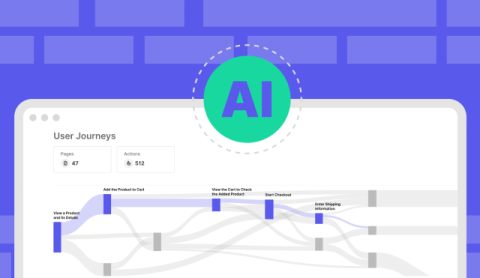
How to Debug Agentic AI: From Failed Output to Root Cause

In traditional QA, debugging means tracing a failed test step to a broken function, a missed config, or bad data. There's usually a clear defect, a fixable cause, and a predictable outcome. But in agentic AI systems where outputs are shaped by language, memory, tool use, and learned behavior failure is rarely that clean. Instead, it looks like: If Blog 4 taught us how to design tests that stress these systems, this blog is about what to do when those tests fail.

Compliance & Audit in Agentic Systems - Testing for Safety, Ethics, and Traceability

Agentic AI systems don’t just need to work — they need to be explainable, traceable, and auditable. In regulated environments like banking or healthcare, it’s not enough to pass test cases. You must prove what the AI did, why it did it, and whether it stayed within policy. One company’s AI assistant began recommending high-risk financial products to sensitive users — and no one knew when it started or why. The fix?

How to Achieve Both Speed and Quality in Insurance App Testing?

Insurance software systems are getting more complex, with interconnected features and increasing risks. Yet the market demands faster delivery. Speed and Quality in Insurance software testing is now a necessity across the board. If you release too fast without proper checks, you risk system failure. If you test too long, you slow the business down. This raises a simple but critical question: how do you test fast and test right?

Test Documentation: Importance, Types, and Best Practices

Test Documentation is the backbone of a reliable testing process. It shows how you plan testing and how you record results. In this article, you will learn the essentials of Test Documentation, the importance of test documentation for your releases, and the test documentation best practices that raise quality. We keep things simple and useful. You get examples and steps that you can apply today. Let's dive in!

Why QA Must Be Involved at the Decision Table?

QA has long been seen as the final step before release. A gatekeeper. A checklist item. But today’s product velocity and user expectations have changed the game. QA is no longer a stop sign. When done right, QA shapes outcomes across the business. It helps teams release faster, catch issues earlier, and align quality with customer needs. In this article, we’ll show you: Let’s get started.

Test Case Review Process: Steps and Best Practices

The test case review process is how we make sure every test case is clear, correct, and ready to run. We treat it as a simple habit that protects quality before execution. When you follow a strong Test Case Review Process, you reduce rework and raise confidence. You also align teams on what matters and how coverage should look. In this guide, we show you how to review test cases effectively with practical steps and examples. We keep it focused, useful, and easy to apply in your next sprint. Let's dive in!

How to Accelerate Your CI/CD Pipeline with Parallel Testing

The longer your test cycles run, the slower your product ships. This is one of the core challenges of modern DevOps. Your CI/CD pipeline is fast until it hits the testing stage. That's where parallel testing comes in. Instead of running tests one by one, you can run them side by side. On multiple environments. Across devices. All at once. The result? Faster builds, quicker feedback, and higher deployment confidence.