Systems | Development | Analytics | API | Testing

Optimize test management with Tricentis qTest and MCP Server

You’ve likely heard a lot about MCP (Model Context Protocol) lately. It’s one of the many AI functions that are being added into the testing landscape every day. The open-source standard for connecting AI applications to external systems has been getting significant buzz in enterprise software testing, with Tricentis leading the way with its industry-first secure remote MCP servers.

Federated Deployments with Control Plane Groups

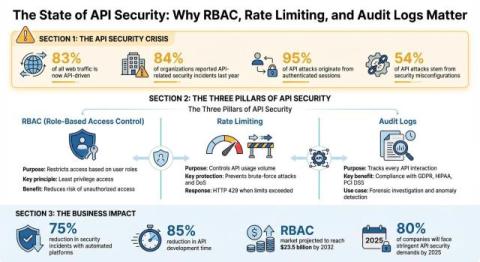
In this blog post, we'll talk about the significant challenge of managing and governing a growing number of APIs across multiple teams in an organization — and how Control Plane Groups are a clear solution to avoid the chaos of inconsistent policies and operational bottlenecks. Scaling your API infrastructure is tough. Managing a sprawling landscape of APIs, especially across multiple teams, can feel like an impossible task.

How We Gave Life to an AI Agent with the Unitree Go2 Robot

Every year, WSO2Con brings together developers, tech enthusiasts, and IT leaders from around the world to dive into the latest in APIs, identity management, integration, and now AI. It’s a space to learn from keynotes and hands-on sessions, share best practices, and get a first look at what’s new from WSO2. So when people walked into the AI Labs at WSO2Con, they expected to hear about AI agents. What they didn’t expect was to meet one, embodied inside a four-legged robot dog.

How to Make Website Launching Effortless with the Right Tools

Launching a website used to be a complex, time-consuming process, requiring a deep understanding of code, design, and server management. But today, thanks to powerful tools, website creation has become incredibly simple and user-friendly. Whether you're a business owner, freelancer, or hobbyist, the right combination of hosting and website building tools can make the process smooth and effortless. For example, you use a modern AI website builder that creates a website for you. And that's not all.

Driving Climate Action Through Data: How C40 Cities is Scaling Knowledge for a Healthier Planet

The climate crisis is the defining challenge of our time, and cities are on the frontlines. Home to more than half of the world’s population, cities are both major contributors to global emissions and critical drivers of climate solutions. Delivering cleaner air, healthier communities, and resilient infrastructure requires not just commitment, but the power of data to guide and accelerate action.

The Agentic Semantic Layer and OSI: A New Standard for AI

At ThoughtSpot, we've long understood that a robust semantic layer is the linchpin of a successful data strategy. Our Agentic Analytics Platform is built on a semantic foundation that makes it possible for anyone to get trusted, instant answers from data using simple natural language. However, the industry has struggled with a foundational challenge for years: a lack of a common semantic standard.

How to Generate a Secure REST API from SQL Server (2025 Guide) | DreamFactory

Modern apps, dashboards, and integrations need SQL Server data over HTTP. The safest pattern in 2025 is: expose only what you intend via read-only views, front it with a managed API layer (authn/authz, rate limits, logging), and publish documented REST endpoints. This guide shows a practical, production-ready path with DreamFactory.

Testing if Franken PHP Classic Mode is faster and more scalable than PHP-FPM

FrankenPHP bills itself as “The Modern PHP App Server” and provides a single-process solution to running PHP. Its worker mode allows to greatly increase the performance of cleanly developed applications that are compatible with it by saving on framework bootstrapping time. Unfortunately, not every application is compatible with worker mode. Depending on the amount of global state kept by the application, updating it for worker mode is not always easy.

Highlighting Elements in Selenium for Better Testing

When running UI tests with Selenium, you don’t always know what’s happening behind the scenes. Is your script clicking the right button? Is it filling the correct field? That’s where highlighting an element in Selenium makes a difference. Highlighting is a simple trick that gives you visual confirmation during test execution. It changes the appearance of the element temporarily (usually by adding a border or background color) so you can instantly see where the action is taking place.