The latest News and Information on Software Testing and related technologies.
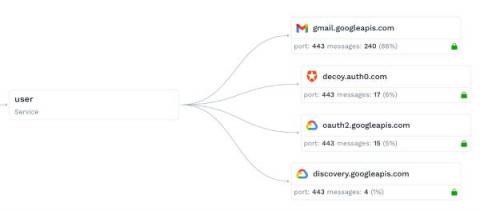
Building, running and scaling SaaS demo systems that run around the clock is a big engineering challenge. Through the power of traffic replay, we scaled our demos in a huge way. A few weeks ago we launched a new demo sandbox. This is actually a second generation version of our existing demo system that I built a few months ago (codename: decoy). Because the traffic viewer page shows the most recent data by default, you need to constantly be pumping new data in there. Any type of real-time SaaS system is going to have a similar requirement. So this needs to be planned.
The busy month of November full of fun times and hard work has finished and it’s time to share the updates we made to Loadero during the month. We added new media files for participant’s webcam simulation, made various performance improvements, added browsers and published the last post in our popular series about using Javascript for test automation. Here’s a list of the main updates in Loadero this month.
This blog is an attempt to help you understand DevOps and MLOps and their differences and similarities.
Apache JMeter is a Java-based, open source testing tool, which can help you create and run functional and load tests for Websites, APIs (REST and SOAP) and other web services. In this example we are going to have a look on how to create and run a JMeter test using a CSV file for our data, and consume the data in our test from that CSV file. First, let’s open JMeter and create a new JMeter test script. Add a Thread Group Inside the Thread Group add the following.